

Mobalytics is a gaming analytics platform that acts like a personal improvement assistant. It connects to your game account, tracks your matches, and turns your performance into clear, actionable feedback so you can improve faster and climb more consistently.
Instead of only showing basic stats, Mobalytics focuses on coaching-style insights, it highlights what you do well, what’s holding you back, and what to work on next.
What Mobalytics is used for
Most players use it for three things:
- Planning before a match: builds, scouting, and matchup context
- Getting help during a match: overlays with timers, insights, and reminders (supported games)
- Learning after a match: post-game analysis, trend tracking, and highlight review

Key features
| Phase | What you get |
|---|---|
| Before the match | Player scouting, recommended builds, draft prep |
| During the match | In-game overlay, timers, live insights (game dependent) |
| After the match | Performance breakdowns, strengths and weaknesses, match history |
| Between matches | Guides, tier lists, champion and comp resources |
Core feature – Performance analytics and the GPI score
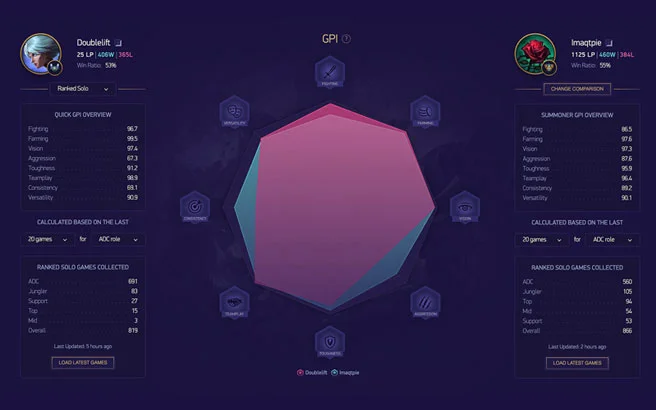
One of the signature ideas is its Gamer Performance Index (GPI).
The goal is simple: translate your match data into a readable “skill profile” that shows where you are strong and where you leak wins. You typically get a breakdown across multiple skill areas (like farming, fighting, vision, objectives, survivability, consistency), so you can focus your practice instead of guessing.
Common ways players use this:
- Finding the real reason they are stuck (example: dying too much mid game, weak vision habits)
- Tracking improvement over time, not just the last game
- Setting a single focus area for the next session
Pre-game tools
Mobalytics pre-game features are built to help you load into a match with a plan.
Typical pre-game tools include:
- Player scouting: quick context on teammates and opponents (rank, trends, recent performance)
- Build recommendations: suggested runes, items, and skill order based on current data
- Matchup context: what to watch for in lane or in early game plan
This is especially useful in solo queue, where small edges in preparation often decide the game’s first 10 minutes.
In-game overlay
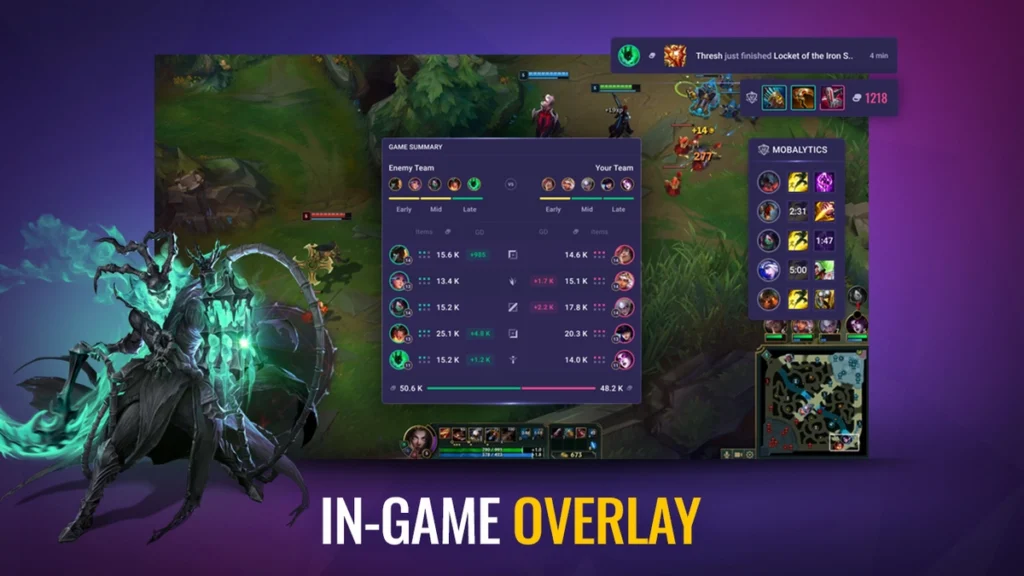
For supported games, Mobalytics offers a desktop overlay (commonly via Overwolf) that shows information while you play.
Depending on the game, the overlay can include:
- Timers and trackers (jungle timers, spell timers)
- Live game context (gold lead and similar “state of the game” signals)
- Reminders and prompts (power spike moments, matchup tips)
It’s meant to reduce the amount of mental bookkeeping you do mid-game, so you can focus on execution and decision-making.
Post-game analysis
After each match, Mobalytics typically provides a post-game report that helps answer:
- What went well?
- What caused the loss or what nearly threw the win?
- What should you improve first?
Common post-game elements include:
- Match stats beyond KDA (objectives, vision, damage context, CS trends)
- Trend tracking across many games (not just one)
- Ranked progress tracking and performance history
Some versions of the desktop experience also include automatic highlight detection, so you can quickly review key moments without manually scrubbing replays.
Builds, tier lists, and learning tools
Mobalytics is not just a stats page, it’s also a big library of gameplay resources.
You will usually find:
- Tier lists that help you identify strong picks in the current patch
- Champion pages (builds, runes, counters, combos, tips)
- TFT meta tools like comp lists, team builder features, and guides
- Game-specific guides for supported titles (varies by game)
If you are the type of player who wants one place for “what to pick” plus “how to play it,” this is one of the main reasons people stick with Mobalytics.
Want a quick snapshot of the meta? Check our tier lists for every role and rank. We update after each patch using fresh performance data.
Supported games
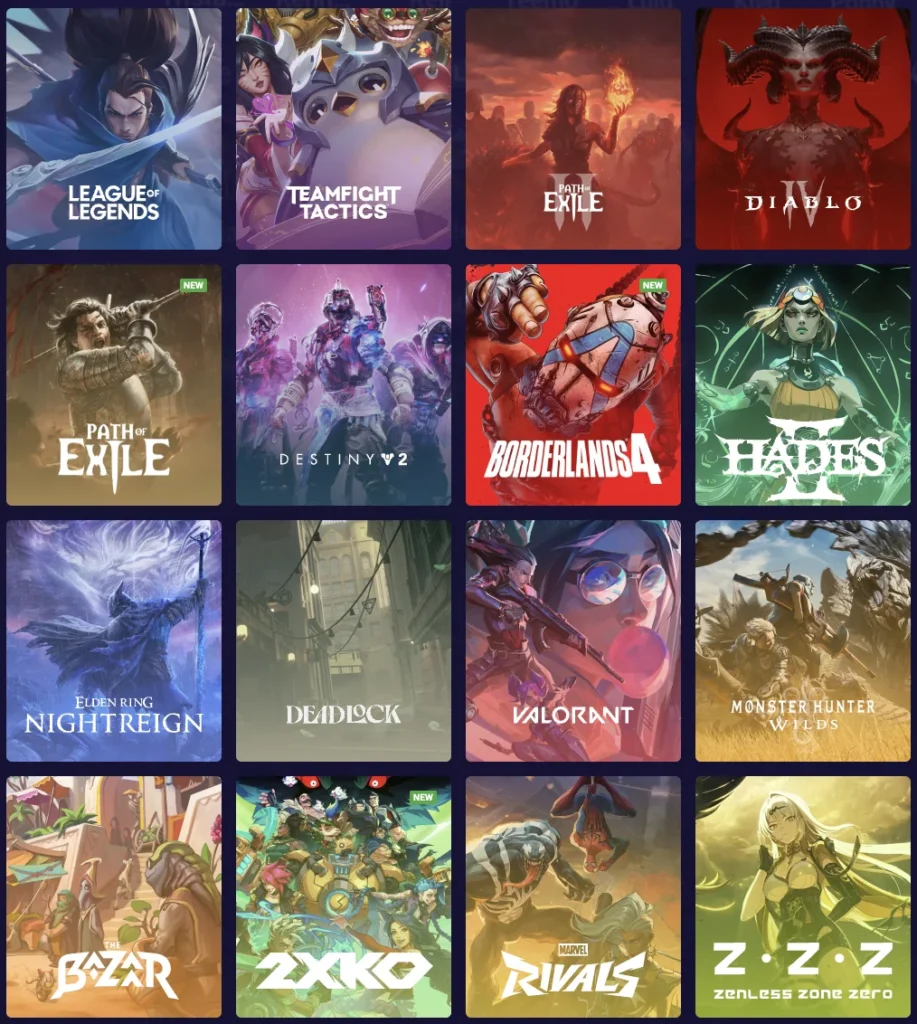
Mobalytics supports multiple games, but feature depth varies. Some games have full profile tracking and overlays, while others focus more on guides and meta tools.
Here’s a practical overview based on what Mobalytics and its desktop listing highlight:
| Game | What Mobalytics commonly offers |
|---|---|
| League of Legends | Full ecosystem: builds, scouting, tier lists, profile stats, desktop overlay |
| Teamfight Tactics | Comps, tier lists, guides, team builder, overlay support |
| Valorant | Profile and match tracking features (overlay features are more limited than LoL) |
| Diablo IV | Game hub and guides, some desktop support listed |
| Legends of Runeterra | Listed as supported in the desktop app ecosystem |
| Destiny 2 | Listed as supported in the desktop app ecosystem |
| Lost Ark | Previously supported, later announced as sunset (platform shutdown) |
You will also see additional games listed on Mobalytics as “game hubs,” meaning you can browse guides and meta content for them even if they do not have the same overlay depth as LoL or TFT.
Free vs Plus: what do you get?
Mobalytics is free to use, and the desktop app listing notes it can contain ads, with an optional subscription.
Mobalytics also offers Mobalytics Plus, which is the paid tier. Plus typically focuses on:
- More detailed pre-game scouting and deeper profile insights
- Extra in-game features and convenience options
- An ad-free experience and additional content access
Pricing can vary by plan length, and longer plans are usually cheaper per month.
Mobalytics – FAQ
Is Mobalytics free to use?
Yes. You can use Mobalytics for free, including core features like profile tracking and performance analytics. There is also a paid tier (often called Plus) that unlocks extra features and removes ads.
Which games does Mobalytics support?
Mobalytics is best known for League of Legends and Teamfight Tactics, and it also supports other popular games through its site and desktop app ecosystem. Feature depth varies by game.
Does Mobalytics work as an in-game overlay?
In supported games, yes. The desktop app can provide an overlay with live tools such as timers, matchup tips, and other game-context widgets, depending on the title.
Can Mobalytics help me climb ranked?
It can. The main benefit is turning your match history into clear strengths and weaknesses, so you can focus practice on what actually loses you games, instead of guessing.
Is Mobalytics allowed, or can it get me banned?
Mobalytics is built to follow the rules for each game it supports, but policies can change. Use the official app, avoid anything that automates gameplay, and double-check the game publisher’s current third-party app rules if you’re unsure.
What other platforms can I use besides Mobalytics?
Other companion apps or platforms that can improve your gameplay are Porofessor, U.GG, and OP.GG.



0 Comments