

If you want to improve in League of Legends, you need more than “play more games.” You need to know what’s actually working right now, which champions are strongest in your role, and what builds and runes give you the best chance to win. That’s exactly what U.GG is built for.
U.GG at a glance
| What you want to do | Where to go on U.GG | What to look for | Quick tip |
|---|---|---|---|
| Pick a champion that fits the meta | Tier List | Tier, win rate, pick/ban rate | Filter to your rank first |
| Get the best runes and items | Champion page | Runes, items, skill order, summoners | Make sure role is correct |
| Learn your matchup | Champion page | Lane counters, matchups | Check lane specific data |
| Track your progress | Summoner Profile | Champ win rates, KDA, CS trends | Look at 10 to 20 games, not 1 |
| Copy what elite players are doing | Pro Builds | Recent builds and rune trends | Use as inspiration, not a script |
| Speed up prep and get timers | Desktop App | Auto-import, overlays, post-game | Keep overlays minimal |
With U.GG, you can quickly look up the best-performing builds for any champion, check tier lists for your rank, and review your own match history to spot patterns in what you’re doing well, and what’s costing you games. Whether you’re trying to climb in ranked, learn a new champion, or stop autopiloting in champ select, U.GG gives you clear, data-driven answers you can apply immediately in your next match.

Champion Statistics & Builds
U.GG provides up-to-date champion statistics and recommended builds to help you make the best decisions for any champion you play. Each champion’s page is packed with information drawn from millions of recent games, so you can trust it’s accurate and current. Here’s what you get on a champion page:
Performance Stats
Key metrics like win rate, pick rate, and ban rate for the champion (often broken down by role and rank), showing how well that champion is doing in the current patch.

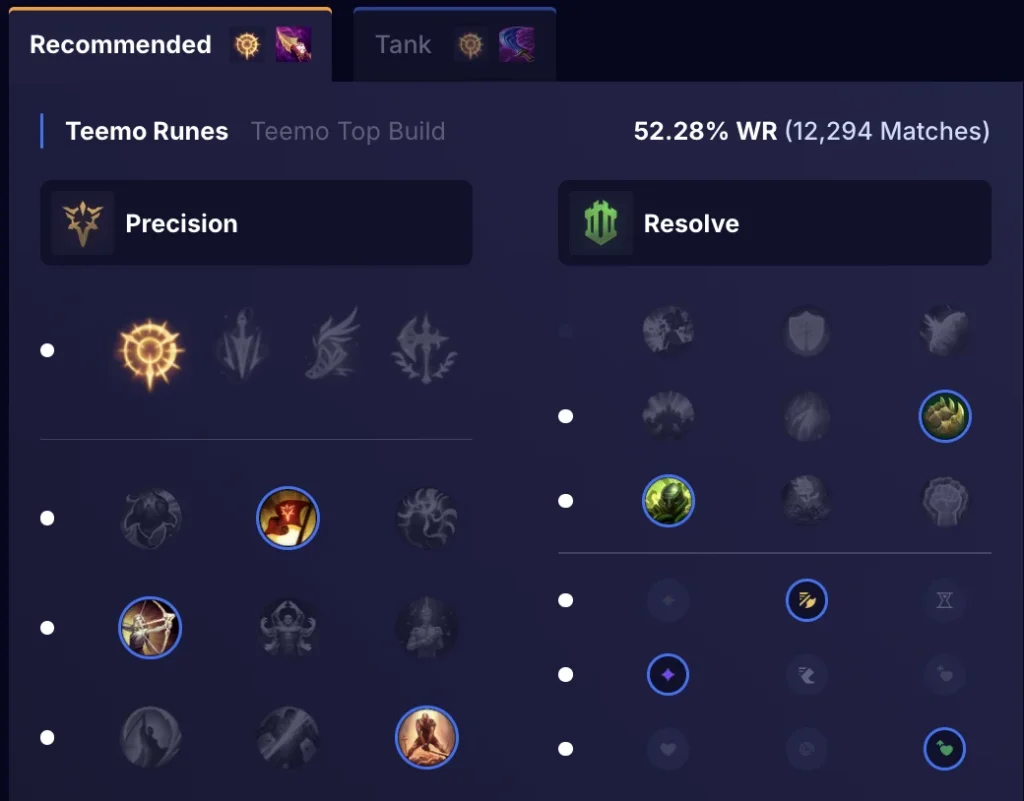
Recommended Build
Data-driven suggestions for your runes, summoner spells, skill upgrade order, and item purchases. This “optimal build” is calculated from high-win-rate games, so you see the items and setup that give the best results for most players.
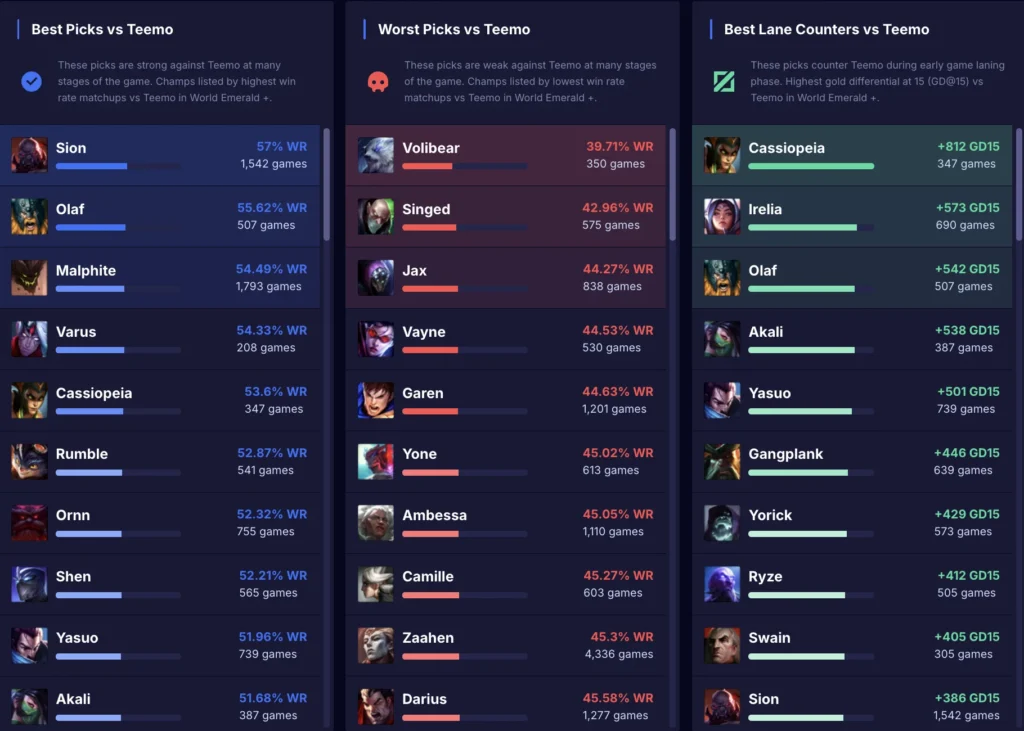
Counters & Matchups
A quick look at which champions your chosen champ tends to do well against or struggle against. This helps you anticipate tough opponents and adjust your playstyle or item choices accordingly.
Filters for Personalization
Filters help you make U.GG’s info match your games. Instead of a one-size-fits-all build, you can narrow the data to what works for your rank, role, and matchup.

Use these filters first:
- Rank: Shows what wins at your skill level
- Role/Lane: Makes sure you get the right runes and items for that position
- Patch: Keeps the build up to date after buffs and nerfs
Use these when needed:
- Region: Slight meta differences
- Game mode: Ranked vs ARAM builds can be very different
- Matchup: Helps vs a specific lane opponent, if enough games are shown
The Champion Statistics & Builds page is like a quick coaching sheet. It removes guesswork by showing the most successful runes, items, and skill order from recent matches. It is useful for learning a new champion, and for making sure your main is still built the right way, so you can go into each game with a clear plan.
Tier list
U.GG’s Tier List is a quick way to see which champions are strongest right now. It updates each patch and uses real match data to rank champions by role, based mainly on win rate, with pick rate and ban rate helping show how popular and impactful a pick is.
How to use it
- Pick your role: Top, Jungle, Mid, Bot, Support
- Choose your rank bracket: All Ranks or your own rank range
- Read the tiers: S = top meta picks, A/B = solid choices, C/D = weaker or harder to win with
The tier list is meant to guide champ select. Use it to find a few strong options for your role, then check the champion page for the best runes and items.
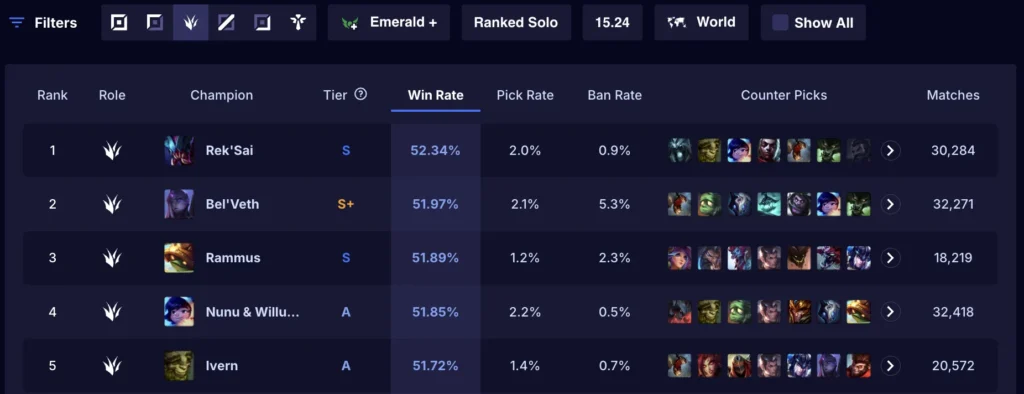
The Tier List is super useful for players who want to keep up with the meta (the ever-changing landscape of which champions are strong). If you’re not sure which champion to pick or ban in your games, checking the U.GG tier list can give you quick guidance. Newer players can use it to figure out good champions to learn, and seasoned players might use it to stay ahead of the curve on which picks are rising or falling in power. Essentially, with the tier list you don’t have to guess who the “OP” (overpowered) champions are – it’s all laid out for you, based on actual performance numbers. This means you can make more informed decisions in champ select and have confidence that you’re choosing a strong character for the patch.
Summoner Profiles & Match analysis
U.GG is not just for champions, it also lets you look up any player profile and break down their recent games. Search a summoner name and you will see a clear overview of how they are performing, whether it is you, a friend, or a pro.
What you typically see on a summoner profile
- Rank overview: Current rank, LP, and season win/loss
- Key stats: Win rate, KDA, and sometimes CS trends or streaks
- Champion performance: Your most played champs, plus win rate and average results on each
- Match history: Recent games with quick summaries like champ, result, KDA, and game length
- Match reports: A deeper look at one game, including the full scoreboard, items, and game details (sometimes graphs like gold over time)
Use it to spot patterns fast, for example which champions you win on, when you die too much, or whether you are consistent in farm and performance.
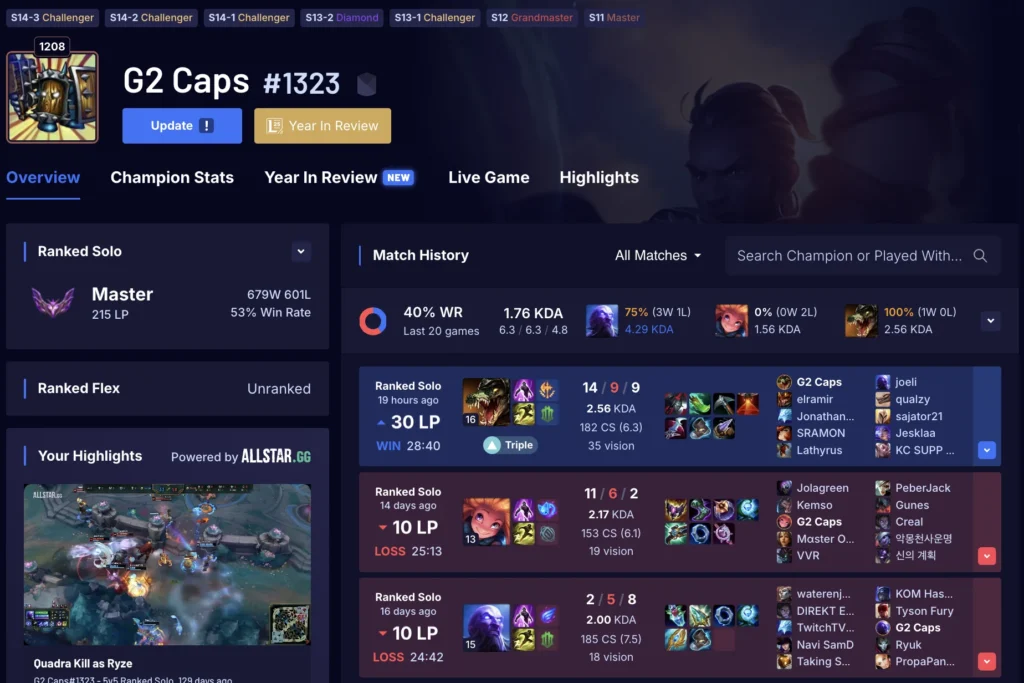
U.GG’s summoner profiles and match analysis tools are fantastic for anyone looking to improve or track their progress. By reviewing your own profile, you can spot trends – for instance, you might notice you have a great win rate on one champion (maybe you should play them more!) or that your average deaths have been creeping up in recent games (a sign to work on positioning). The match analysis lets you dive in and see where a game went right or wrong; you can pinpoint if you fell behind in lane early, or maybe if your team had a big lead until a certain point. It’s also useful for friendly competition or learning from others: you can check your friends’ profiles or even high-ranked players’ profiles to compare stats and see what they’re doing differently. Overall, this feature turns raw game data into insights about your gameplay, helping you celebrate your strengths and focus on areas to get better.
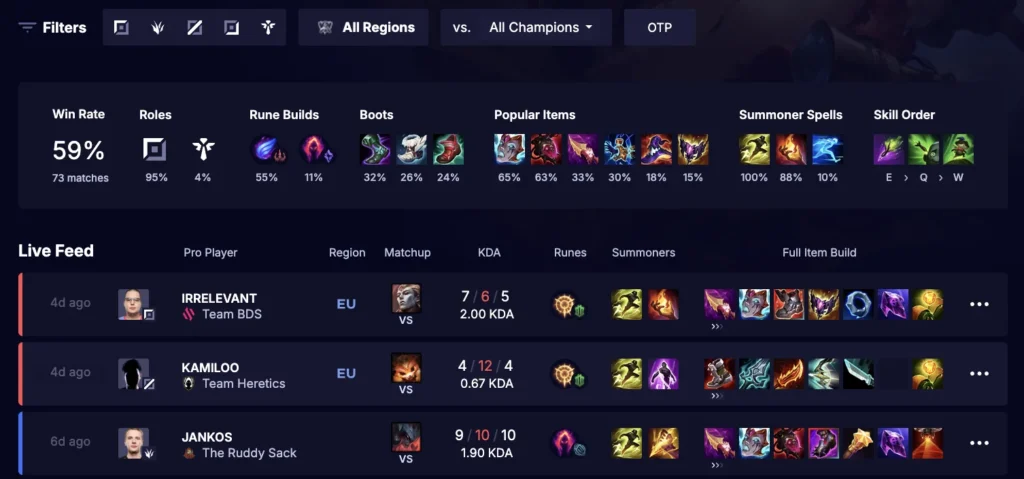
Pro build and guides
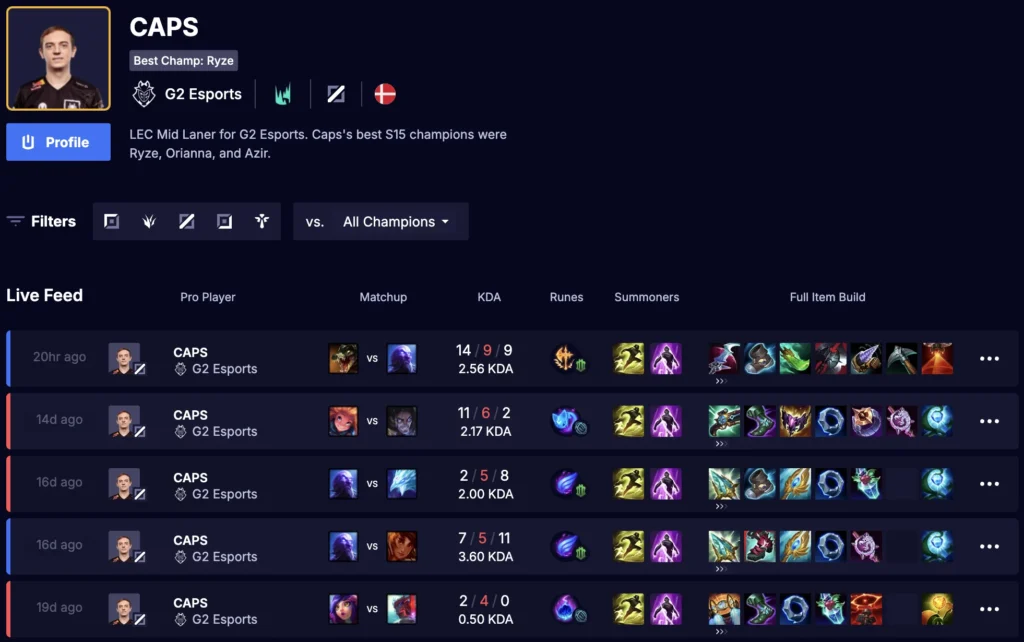
U.GG’s Pro Builds section shows how top players are building a champion in real games. It is a quick way to copy a strong setup or understand what is trending at high level.
What you can do
- Search a champion and see recent games played by pros and high-ranked players
- View their runes, summoner spells, item order, and sometimes skill order
- Spot common trends, like which core items most pros are rushing and which situational items appear in certain matchups
How to use it well
- Focus on the repeated patterns across multiple games, not one single build
- Use it to find a strong “default” build, then adjust if your matchup is different
If you want a fast, practical boost, this video runs through 30 key League settings and hotkeys that can make your inputs cleaner and more consistent, which usually means fewer misclicks and better control in fights. It’s an easy way to upgrade your setup before you queue again.
Live game tool (desktop app)
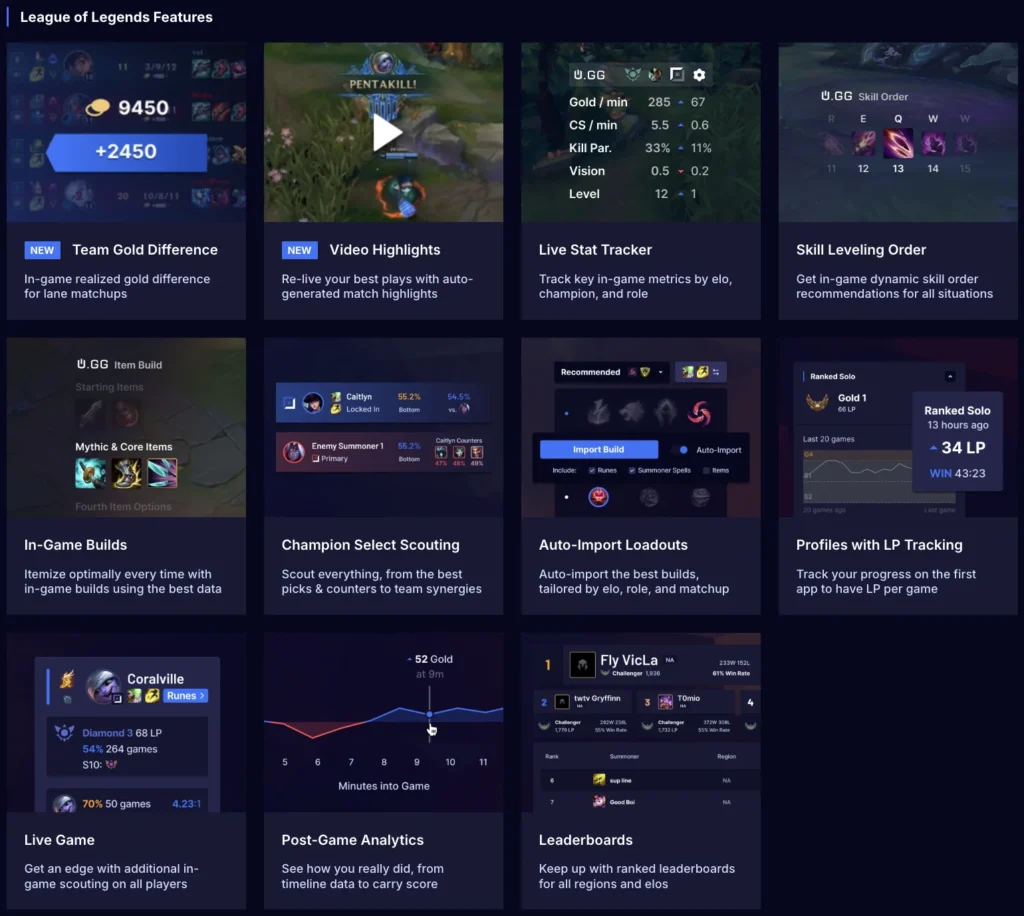
U.GG isn’t just a website – it also offers a Live Game Tool, which is a desktop app you can run alongside League of Legends for real-time assistance. Think of it as a smart companion that gives you useful information and features while you’re in champion select and in-game, live.
Pre-Game Prep
The U.GG app helps you set up faster in champ select, so you spend less time clicking and more time planning the game.
What it can help with
- Suggested picks and bans based on the meta
- Quick matchup context based on what is locked in
- Auto-import of runes and builds for your selected champion
In-Game Overlays
In-game overlays keep useful info on your screen, so you do not need to alt-tab mid match.
Common overlay info
- Objective timers, like dragon and baron
- Player info snapshots (rank, most played champs, recent performance)
- Build guidance, like core items and common upgrades
- Simple lane tracking, like whether you are ahead or behind in gold
Post-Game Analysis
After the match, the app gives you a quick performance summary so you can learn from the game while it is fresh.
What you can review
- Damage dealt and damage taken
- Vision score and warding impact
- Key performance stats compared to the lobby
- Highlights of important moments (if enabled)
- Ranked results, including LP change
How to use it to improve
- Pick one metric that was weak, for example early deaths or low vision
- Set one small goal for the next 3 games
Progress tracking and more
The U.GG app is also useful outside of the match, because it helps you track progress over time and stay organized when you are grinding.
What you can do
- Profile tracking: Check your own stats quickly, and look up friends or other players
- Rank and LP history: See how your climb is going game by game
- Leaderboards: Compare performance and spot top players
- Light social features: Keep an eye on friends’ status and results (where supported)
If you want even more help fine-tuning your picks and improving your gameplay, you can find role-by-role tier lists and a full champion overview, so you always know what’s strong in the current meta:
U.GG FAQ
Is U.GG free to use?
Yes, the website is free to browse for champion builds, tier lists, and summoner profiles. There is also a desktop app you can download if you want live game features.
How do I make sure I’m using the right build for the current patch?
Always check that you’re viewing the latest patch on U.GG and filter for your role. If you play a champion in multiple lanes, make sure you’re on the correct role page before copying runes and items.
Should I follow the tier list blindly?
No. Use the tier list as a starting point, then narrow it down to champions you actually play well. A comfortable A-tier pick you know is often better than an S-tier champion you barely understand.
What’s the best way to use Summoner Profiles to improve?
Look for patterns in your recent games, like which champions you win with, how often you fall behind early, and whether your deaths spike in losses. Then set one simple goal for the next games, like dying less before 10 minutes or improving CS consistency.
What does the U.GG desktop app do, and is it worth using?
The app can help with things like importing runes, showing recommended builds, and providing extra info during champ select and in-game. If you like having guidance without alt-tabbing, it’s worth trying, just make sure you download it from the official U.GG site and keep an eye on Riot’s third-party app rules as they can change.




0 Comments