

Is League of Legends down right now?
Riot is currently reporting issues: North America (maintenance: Maintenance Notification) · Brazil (incident: Maintenance Notification) · LAN (maintenance: Maintenance Notification) · LAS (maintenance: Maintenance Notification) · Middle East (incident: Restricted Queue Times).
| Region | Status |
|---|---|
| North America | 🔧 Maintenance |
| EU West | ✅ Operational |
| EU Nordic & East | ✅ Operational |
| Korea | ✅ Operational |
| Brazil | ⚠️ Incident |
| Japan | ✅ Operational |
| LAN | 🔧 Maintenance |
| LAS | 🔧 Maintenance |
| Oceania | ✅ Operational |
| Türkiye | ✅ Operational |
| Russia | ✅ Operational |
| Middle East | ⚠️ Incident |
| Southeast Asia | ✅ Operational |
| Taiwan/HK/Macao | ✅ Operational |
| Vietnam | ✅ Operational |
Recently tracked events:
- 2026-11-04 04:05 UTC — Vietnam: Login Issues (incident)
- 2026-11-04 04:05 UTC — Taiwan/HK/Macao: Login Issues (incident)
- 2026-11-04 04:05 UTC — Southeast Asia: Login Issues (incident)
- 2026-11-04 04:05 UTC — Oceania: Login Issues (incident)
- 2026-11-03 00:05 UTC — Brazil: Maintenance Notification (maintenance)
Monitored automatically via Riot’s official status feed. Last status change detected: November 4, 2026 09:07 UTC.
The live status table at the top of this page mirrors Riot’s official status feed for all 15 League of Legends server regions and refreshes every hour. If it shows no incidents for your region, the servers are most likely fine, and the problem is usually local: your client, your network or your ISP.
If League suddenly refuses to log you in, your ping spikes for no reason, or the client just hangs on “reconnecting”, the first thought is usually: are the LoL servers down, or is it just me?
This page is here to answer that. We track recent outages, scheduled maintenance and community-reported issues, and show you how to quickly check the League of Legends server status yourself so you don’t waste time restarting your PC twenty times for no reason. Last reviewed: July 8, 2026.

Current and past League of Legends outages and maintenance
Below is a collection of recent maintenance periods and outages affecting League of Legends. Some of these are officially confirmed by Riot, while others come from large waves of player reports across community platforms.
| Start Time (UTC) | End Time (UTC) | Information | Affected Regions |
|---|---|---|---|
| 24/06/2026 00:25 | 24/06/2026 03:00 | Client launch failures, ~10,000 Downdetector reports at peak; Riot’s status page showed no incident while it unfolded | Americas (evening PT) |
| 04/01/2026 00:00 | 05/01/2026 00:00 | Global login outage (expired SSL certificate) resolved | Global |
| 05/12/2025 08:47 | 05/12/2025 09:12 | Third-party outage (Cloudflare) caused widespread access/login errors | Global |
| 18/11/2025 11:20 | 18/11/2025 17:06 | Third-party outage (Cloudflare) caused widespread connectivity/login issues | Global |
| 07/11/2025 00:00 | 07/11/2025 23:59 | Client issue: game not launching after Champion Select (workarounds published) | Global |
| 06/10/2025 00:00 | 06/10/2025 23:59 | User-reported lag spikes/disconnects (Riot investigating) | Global |
| 13/08/2025 19:00 | 13/08/2025 22:00 | User-reported login/connectivity issues | Global |
| 31/07/2025 00:00 | 31/07/2025 23:59 | Client issue after Patch 25.15: launch/crash problems linked to antivirus blocking (fix published) | Global |
| 22/07/2025 18:00 | 22/07/2025 20:30 | User-reported matchmaking issues | EUW & NA |
| 25/01/2024 00:00 | 26/01/2024 00:00 | Champ Select chatbox/DM bug resolved | Global |
| 01/10/2023 00:00 | 01/10/2023 23:59 | Widespread login issues reported | Global |
| 24/05/2023 00:00 | 24/05/2023 08:00 | Extended maintenance | TR |
| 26/04/2023 02:00 | 26/04/2023 10:00 | Extended maintenance | EUNE |
| 12/04/2023 00:00 | 12/04/2023 08:00 | Extended maintenance | RU |
| 01/03/2023 02:00 | 01/03/2023 12:00 | Extended maintenance | EUW |
| 28/09/2022 02:00 | 28/09/2022 12:00 | Cloud migration maintenance | BR |
| 14/09/2022 06:00 | 14/09/2022 16:00 | Cloud migration maintenance | LAN |
| 31/08/2022 07:00 | 31/08/2022 19:00 | Cloud migration maintenance | LAS |
| 31/08/2022 07:00 | 31/08/2022 11:00 | Cloud migration maintenance | NA |
| 18/08/2022 08:00 | 18/08/2022 20:00 | Extended maintenance | NA |
| 30/06/2022 18:00 | 01/07/2022 05:00 | Extended maintenance | OCE |
| 30/06/2022 05:00 | 30/06/2022 07:00 | Maintenance completed | OCE |
| 30/06/2022 04:00 | 30/06/2022 14:00 | Extended maintenance | OCE |
How to check League of Legends server status
If you’re not sure whether there’s a problem with Riot’s servers or if something locally is acting up, here are the most reliable ways to confirm what’s going on.
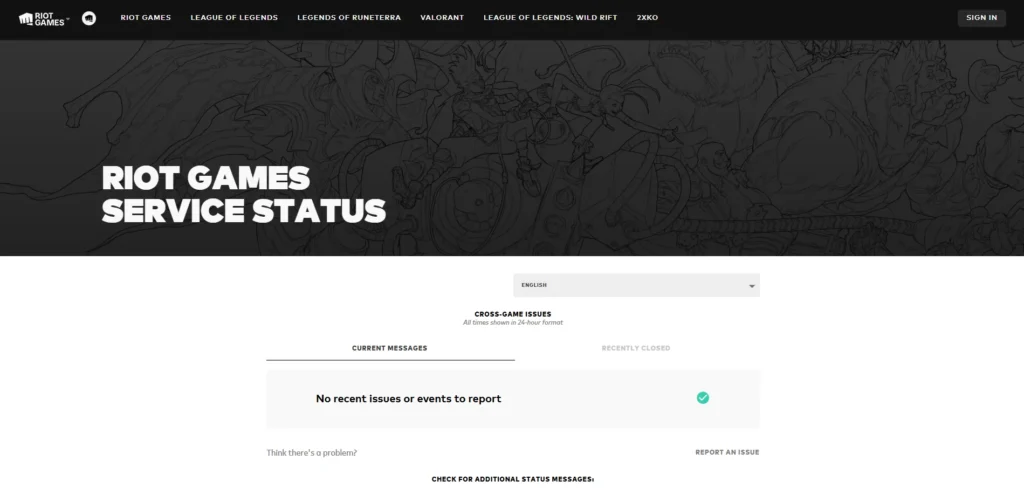
Riot Games’ official server status page
The first place you should check is Riot’s own status hub at status.riotgames.com
This is the most reliable source for confirmed outages and maintenance. Riot updates it regularly with region-specific issues, patch-related downtime and larger incidents.
Open the page, pick League of Legends from the list of games, then select your region. If there’s a known problem with login, matchmaking, the store or anything else, it will usually be listed there.
Downdetector
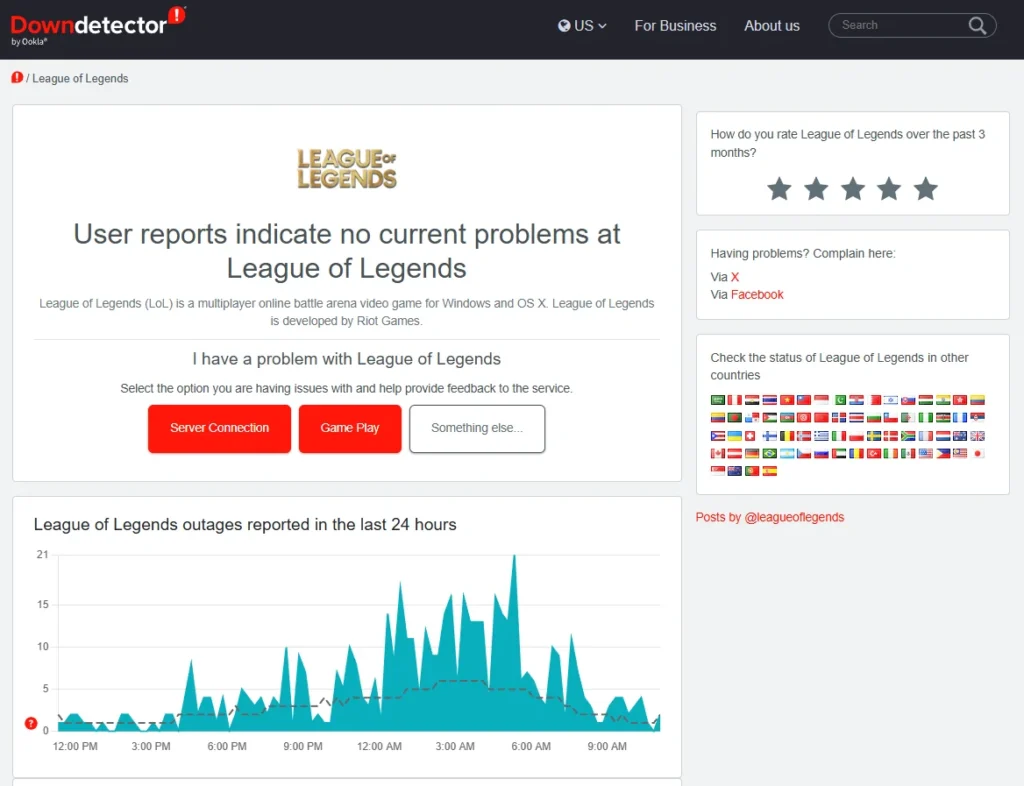
If the official status page looks clear but you’re still having problems, Downdetector’s League of Legends page is a good next step.
It shows player-submitted outage reports in real time. When you see a sharp spike in reports from multiple regions, it’s often a sign that something bigger is going on, even if Riot hasn’t posted about it yet.
Riot Support on X (Twitter)
Sometimes issues show up on social media before they make it to the status page. Riot’s support account at Riot Support on X is where they often post about bugs, login issues, maintenance and region-specific problems. If servers go down unexpectedly, players will usually see confirmation here fairly quickly.

Reddit and community hubs
Because the League of Legends community is so big, word of server issues spreads fast. Checking r/leagueoflegends or larger community Discord servers is an easy way to see if other players in your region are running into the same problem.
If dozens of people are complaining about disconnects or login errors at the same time, you can safely assume it’s not just your own setup acting up.

Which source updates first?
Not all status sources move at the same speed, and knowing the difference saves you a lot of confusion during an outage. Riot’s official page is the source of truth, but it is slow: the monitoring service StatusGator grades it “D” for timeliness, with confirmations often arriving 2 to 4 hours after players first notice problems. During the June 23, 2026 client outage, Downdetector collected roughly 10,000 reports while Riot’s page still showed everything green.
| Source | Speed | Best for |
|---|---|---|
| Downdetector / Reddit | Minutes | Early signal that something is wrong for many players |
| Riot Support on X | Minutes to an hour | First official acknowledgement of bigger incidents |
| status.riotgames.com (mirrored in our live table above) | Often 2 to 4 hours | Official confirmation, maintenance schedules and resolution notices |
Helpful video guide
If you prefer a simple walk-through, this video explains how to check Riot’s server tools step by step:
Why League of Legends servers go down
League is built entirely around online play, so the servers have to handle millions of matches, logins and background connections every day. Downtime can happen for a few main reasons:
Scheduled maintenance
Riot occasionally takes servers offline to deploy patches, adjust backend systems or prepare for seasonal events. Maintenance periods are usually announced the day before, and ranked queues often disable early to avoid match interruptions.
This is common around big gameplay updates, which you can explore in more detail in our LoL Patch Notes section.
Unexpected outages
Sometimes the servers experience unexpected strain. This can happen when a big event goes live, when a bug causes unusual load, or when something fails in one of Riot’s data centers.
These outages tend to get resolved faster than full maintenance, but they can still take anywhere from minutes to several hours depending on complexity.
Regional connection problems
Not all issues come from Riot directly. Some outages only affect specific regions because of routing problems, ISP outages or regional network instability.
This is why Europe occasionally sees problems while North America stays completely stable, or the other way around.
All League of Legends server regions in 2026
League currently runs on 15 live server regions (shards), plus the PBE test environment. Riot’s status feed, and the live table on this page, covers every one of them:
| Shard | Region | Worth knowing |
|---|---|---|
| NA1 | North America | Patches typically deploy around 3:00 AM PT |
| EUW1 | EU West | Patches around 5:00 AM GMT |
| EUN1 | EU Nordic & East | Patches around 3:00 AM CET |
| KR | Korea | Patches around 8:00 AM KST |
| BR1 | Brazil | Patches around 3:00 AM BRT |
| LA1 / LA2 | Latin America North / South | Two separate shards |
| OC1 | Oceania | |
| TR1 | Türkiye | |
| RU | Russia | |
| JP1 | Japan | |
| ME1 | Middle East & North Africa | Newest region, live since June 2024 |
| SG2 | Southeast Asia | PH and TH servers merged into SG2 in January 2025 |
| TW2 | Taiwan / Hong Kong / Macao | Riot-operated since January 2023 |
| VN2 | Vietnam | Riot-operated since January 2023 |
Patches are the most predictable form of downtime: they roll out on Wednesdays (Pacific Time) roughly every two weeks, region by region during local early-morning hours. The next ones are 26.14 on July 15, 26.15 on July 29 and 26.16 on August 12. You can find the full 2026 schedule and what each patch changes in our LoL patch notes hub.
What about League of Legends PBE server status?
The PBE works a little differently from the live servers. It’s a testing environment where Riot experiments with new champions, gameplay systems and UI changes. Because of that, the PBE is far more prone to instability, unannounced downtime and short testing windows.
If PBE suddenly goes offline while live servers are fine, that’s normal. Riot often pushes experimental builds or backend changes without formal announcements. Players frequently share PBE-related downtime reports on Reddit or Discord long before anything appears on official channels.

If you want to stay ahead of big gameplay adjustments before they shift the meta, our news hub and player count analysis offer a broader look at what’s happening in the LoL ecosystem.
What to do if you can’t connect to League of Legends
Before assuming Riot is down, it’s worth ruling out a few common local issues. Client problems are actually the most common culprit: during the June 2026 incident, about 60 percent of player reports were about the game client failing to launch, not the servers themselves.
- Close every Riot process and relaunch
If you get “Unexpected Error With Login Session” or the client never opens, a hidden client instance is often still running. Open Task Manager, end every League and Riot Client process, then start the game again. - Run the Hextech Repair Tool
Riot’s official repair tool fixes corrupted patches, DNS problems and broken installs automatically. It is the first thing Riot Support asks you to run, and you can download it from Riot’s support site. - Restart your router
A simple reset can solve routing or packet loss problems, especially if your ISP is temporarily congested. - Run a speed or stability test
Even if your download speed looks fine, unstable ping can cause huge problems in League. - Try using a VPN
If your local route to Riot’s servers is struggling, a VPN can temporarily connect you through a different path. This often works during ISP-specific outages. - Check for Vanguard errors
Since League runs on the Vanguard anti-cheat, errors like VAN 9001 can block you from playing even when the servers are healthy. A full PC restart resolves most Vanguard driver issues; Riot’s support site has a dedicated page for persistent VAN error codes. - Check Riot’s support page for troubleshooting
If none of the above helps, Riot’s official support resources cover a range of device-specific fixes.
How long LoL outages usually last
Most scheduled maintenance windows last between one and three hours. Unplanned outages vary more but are often resolved within a few hours. Larger issues involving cloud migration or infrastructure changes can take longer, though they are less common.
Seasonal updates, preseason shifts and major patch rollouts are the periods where longer-than-usual downtime is most likely.
Frequently asked questions about LoL server status
How do I check if League of Legends is down?
The easiest way is to check Riot’s official server status page. If nothing appears there, Downdetector and Reddit are usually quick to show early outage reports. You can also use the outage table on this page as a reference for recent issues.
Why can’t I log into League of Legends?
Login problems can come from several sources: active maintenance, a regional outage, ISP issues or problems with the Riot client. Checking both Riot’s status page and Downdetector usually narrows it down.
How long do League outages last?
Simple outages may clear up within an hour or two, while scheduled maintenance has a planned duration. Unexpected issues can last longer if something significant needs to be fixed.
Does Riot announce server issues?
Yes, but not always instantly. Updates may appear first on social media, then on the status page. Community forums often spot issues even earlier.
Why does Riot’s status page show no issues when the game is clearly down?
Riot only posts an incident once it is confirmed internally, which typically takes 2 to 4 hours. Player-report sites like Downdetector spike within minutes, so a gap between the two usually means the incident is real but not yet acknowledged. Our live table mirrors Riot’s official feed, so it updates when Riot confirms.
What does Error Code 7 mean in League of Legends?
Error 7 means Riot’s servers are overloaded, and it is the code you are most likely to see during a real outage or right after maintenance ends. Riot’s advice is to keep trying to log in and check the server status page while you wait.
Can Vanguard cause connection problems?
Yes. Vanguard errors such as VAN 9001 can prevent the game from starting even when every server is online. Restart your PC first, since Vanguard’s driver loads at boot. If the error persists, Riot’s support site lists fixes for each VAN code.
Can I play League offline during maintenance?
No. League of Legends requires a live server connection for all game modes, including custom games.
Stay updated on LoL server changes
Server issues are annoying, but they’re also part of playing an online game as big as League of Legends. The good thing is that you now have a simple place to check what’s going on instead of guessing whether it’s your connection or Riot’s servers.
We’ll keep this page updated with new maintenance windows and notable outages. If you want to see how these problems tie into bigger game updates, you can follow along in our LoL news section and keep an eye on upcoming changes in the patch notes.
And if you’d rather use downtime to improve instead of just waiting, our LoL guides are a good place to start.




0 Comments