

To see how much money you have spent on League of Legends, submit a data request through Riot’s official support ticket form: choose League of Legends, then “Account Management, Data Requests, or Deletion”, then “Formal Personal Data Request”, then “I want to know how much money I’ve spent with Riot Games”. Riot sends back your lifetime total, often within minutes.
That is the short answer. Riot changed this process in 2026: the old self-service page with the big red “Show me the money” button is no longer part of Riot’s official instructions, and the check now runs through a support ticket. This guide covers all three ways to check your spending, what the number includes, and why it often looks lower than you expect. Last reviewed: July 8, 2026, against Riot’s official support documentation (updated June 2, 2026).
The 3 ways to check how much you have spent on LoL in 2026
| Method | What you get | How fast |
|---|---|---|
| 1. In-client Purchase History | List of your RP transactions and refund tokens, no lifetime total | Instant |
| 2. Support ticket (data request) | Your lifetime total spent with Riot on that account | Often minutes, can take a few days |
| 3. Full account data export | Complete data package including all store transactions and monetary purchases | Up to 30 days |
Method 1: Check your purchase history in the League client (instant)
The fastest option lives inside the game client, and most players never notice it. Open the Store, click the small account icon next to “Purchase RP and Gifts”, and select Purchase History. You will see your recent RP transactions and available refund tokens, and the RP Purchase History button lists your real-money RP purchases.
The limitation: it is a transaction list, not a lifetime total. For the full number you need method 2.
Method 2: The official Riot data request (your lifetime total)
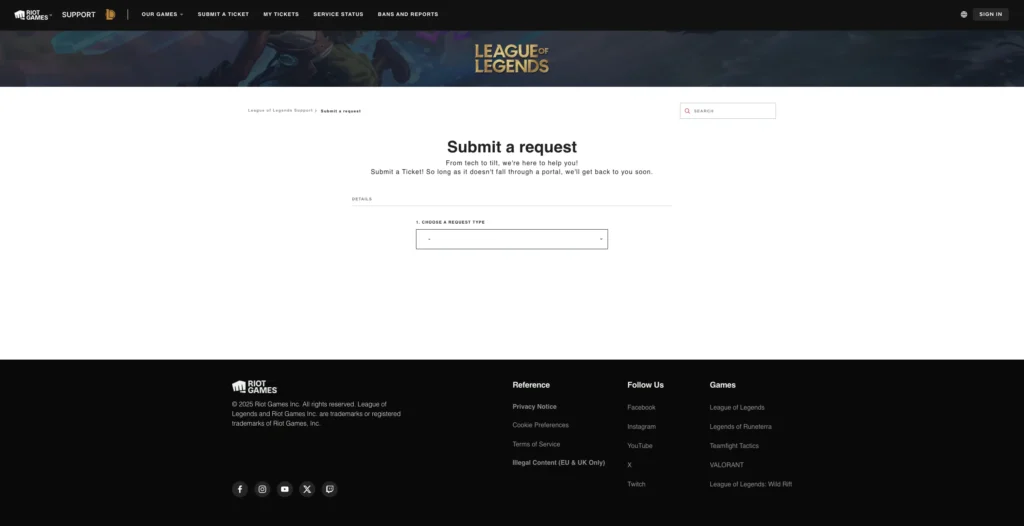
1. Open the ticket form
- Go directly to Riot’s ticket page: Submit a Support Ticket. Riot consolidated its old game-specific support sites in 2026, so older links now redirect here.
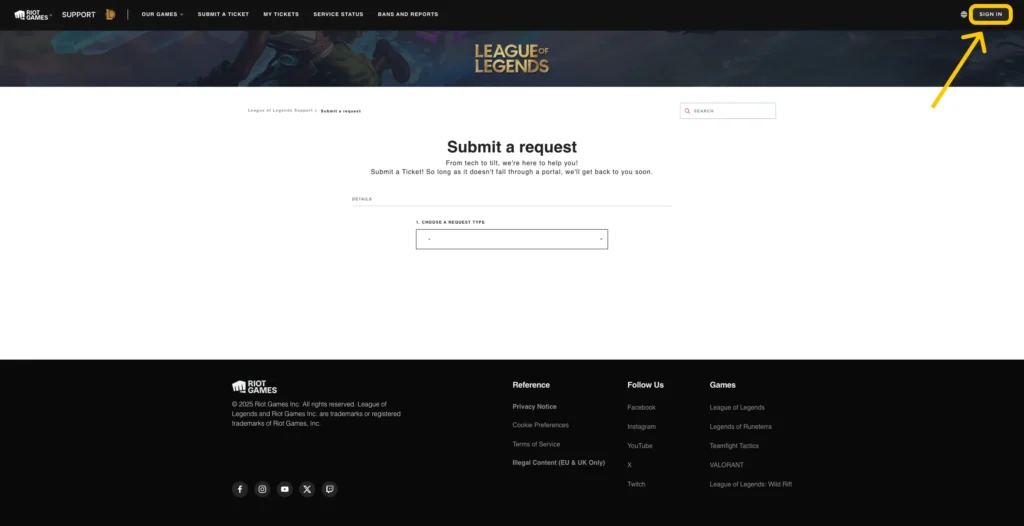
2. Log in to your Riot account
- In the top-right corner, sign in using the account you want the spending report for.
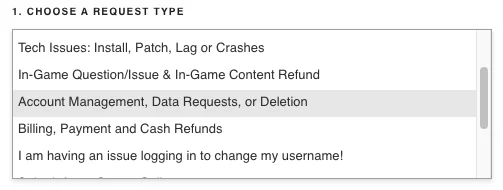
3. Pick the game and the right request type
- Under Product, select League of Legends (the request covers your whole Riot account either way).
- Under Category, select “Account Management, Data Requests, or Deletion.”
- Choose your platform when asked: PC, Xbox or PlayStation. This step is new in 2026.
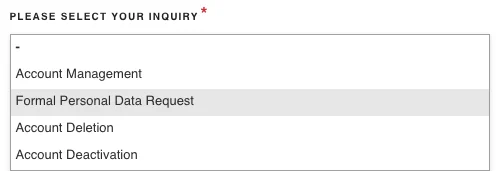
4. Fill in the inquiry dropdowns
- New dropdowns will appear.
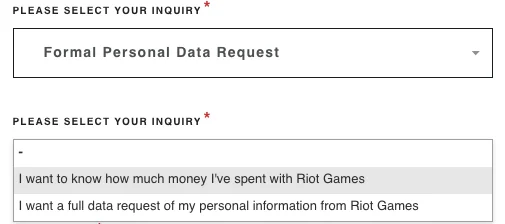
- In “Please select your inquiry,” choose “Formal Personal Data Request.”
- A new dropdown will appear.
- Select “I want to know how much money I’ve spent with Riot Games.”
5. Submit and get your total
- Write a short subject and description (something like “Requesting my total money spent”) and submit the ticket. Riot’s confirmation says a Player Support agent will get back to you, and in practice many requests are answered automatically within minutes. Allow a few days in busy periods.
- Some players still see the instant “Show me the money” button inside the ticket flow. If it appears for you, click it and you get the number right away.
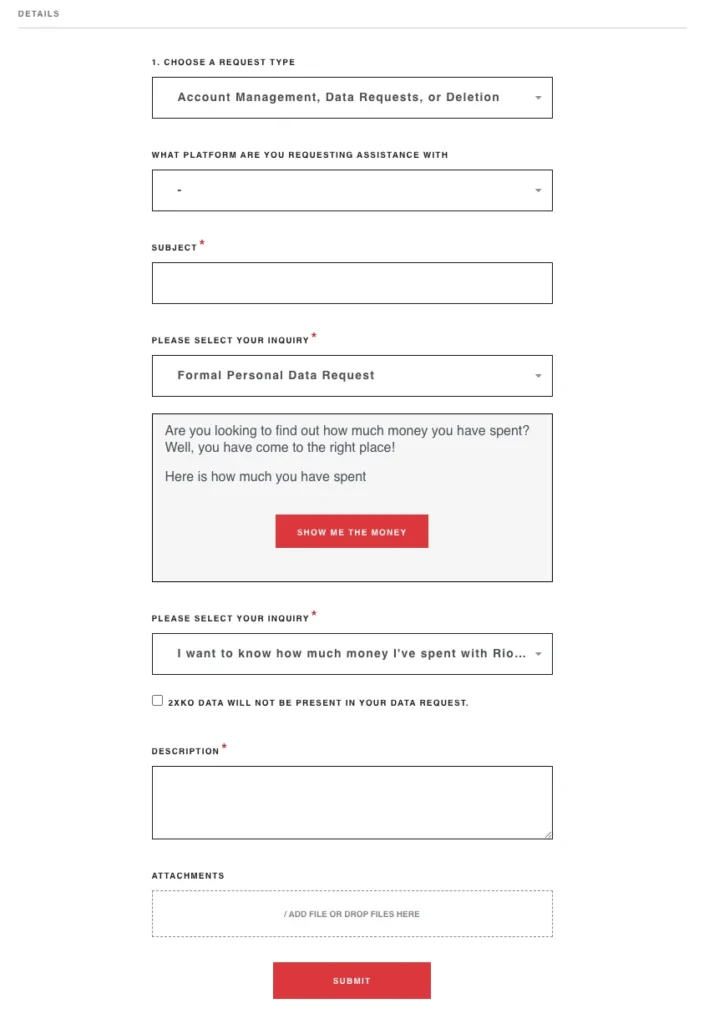
- Click it, and you will either be shocked or pleasantly surprised.
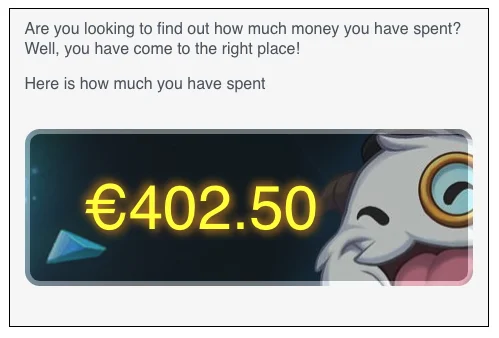
The answer arrives in the currency you actually paid in, so an EUW account gets euros, not dollars. Prepaid RP cards and gift codes are counted too, converted to their money value.
Method 3: Request your full account data (every transaction)
If you want the complete picture rather than one number, Riot’s account data request uses the same ticket flow and returns a downloadable package with, in Riot’s own words, “all store transactions (skins, etc.)” and “all monetary purchases”. Three things to know before you use it:
- Processing takes up to 30 days, and the download link in your ticket expires 30 days after it arrives.
- Changing your email or password while the request is running cancels it automatically.
- You get data for every Riot game tied to the account. TFT on PC sits under your LoL account and RP wallet, while Wild Rift is tracked separately. Korea-registered accounts follow a separate process.

Important things to know
Region matters
Your total only reflects purchases made in the region linked to your account. If you’ve played in multiple regions (EUW, EUNE, NA, etc.), you’ll need to check each one.
Only direct purchases count
The tool only shows money spent directly with Riot. It does not include:
- Gifted RP
- Promo RP
- Third-party purchases
- Event rewards or bonuses
Got multiple LoL accounts?
Run the tool separately for each account — Riot shows spending per individual account.
Is the “Show me the money” tool down?
This is one of the most asked questions about the tool, and the honest answer is: it did not go down, it moved. The timeline:
- Until early 2023: a self-service support page showed your total directly.
- 2023 to 2025: that page went “under construction” and never came back. The red “Show me the money” button lived on inside the support ticket flow, and tickets were often answered instantly by an automated agent.
- 2026: Riot’s official instructions (updated June 2, 2026) describe the ticket flow only. Submit the data request as shown above and you get the same number, usually fast.
How region transfers affect your LoL spending total
If you have ever transferred your League of Legends account to another region, your spending history may appear incomplete. Riot tracks purchases by both account and region, and those logs do not always merge when you move your profile.
Transfers still work the same way in 2026: they cost 2600 RP, apply near-instantly, are one-way with a 90 day cooldown, and are bought in the client store via the account icon next to “Purchase RP and Gifts”. Note that the transfer map has restrictions now: most shards cannot transfer to Brazil, Russia or Korea, and the Middle East runs as its own shard since 2024.
What happens when you change regions
- Purchases made before the transfer may not appear in your new region
- You must check your spending separately in each region your account has existed in
- Old transactions from early seasons may not be recorded in Riot’s current system
- RP purchased years ago in a different region often shows as missing
For example, if you previously played on NA and later transferred to EUW, your EUW total will only reflect purchases made after the transfer. This is one of the most common reasons why a spending report looks lower than expected.
What counts toward your total (and what doesn’t)
When you click the button, the number might not match what you expected. Here’s why.
Included in your LoL spending total:
- RP purchased directly in the League client
- Credit card, PayPal, and prepaid card transactions
- Purchases processed by Riot in your current region
Not included in the total:
- RP gifted to you by friends
- RP earned through missions, events, or promotions
- Wild Rift purchases (tracked separately from your LoL account)
- Very old transactions from early seasons
- Third-party purchases and merch
- Anything bought in the Garena era (see below)
- Purchases made on other regional servers before a transfer
Worth knowing in the gacha era: everything you buy with RP, including Sanctum pulls and Mythic Essence content, is already covered by the RP purchases in your total. TFT on PC shares your LoL account and RP wallet, so it is part of the same number.
If your number seems low, it’s usually due to one of these missing categories.
Why older League of Legends purchases may not appear
League of Legends has undergone multiple backend migrations since its launch in 2009. As a result, some early-season purchases do not appear in the modern spending tool. This typically affects players who have been active since the early days of the game.
These older missing purchases usually fall into one of these categories:
- RP transactions before Riot redesigned the client
- Purchases made before standardized email receipts existed
- Transactions from early prepaid RP cards
- Purchases tied to legacy regional systems
- Logs from Season 1–3 that were never fully migrated
If you started playing before 2014, your total might appear lower simply because certain historical records aren’t stored in Riot’s current database.
Can you see every single purchase you’ve ever made?
Yes, but not through the quick ticket answer, which only gives you the total. For an item-by-item view you have three options:
- Request the full account data export (method 3 above): the package includes all store transactions, so every skin and champion purchase is listed. Expect up to 30 days of processing.
- Check the in-client Purchase History (method 1) for your recent RP transactions.
- Cross-reference your email receipts or PayPal/bank statements for the payment side.
What if your LoL account was originally on Garena?
Before early 2023, League of Legends in Southeast Asia was operated by Garena instead of Riot Games. When Riot took over the SEA servers, player accounts were migrated — but not all spending data transferred perfectly.
This affects players from regions such as:
- Singapore
- Malaysia
- Philippines
- Thailand
- Vietnam
- Indonesia
What you need to know
- Purchases made through Garena’s system may not appear in the Riot spending tool
- RP bought using Garena Shells often does not migrate
- Skins purchased during Garena-run events may appear missing
- Some older SEA accounts show dramatically lower totals after migration
If your account was originally on Garena, this is the most likely explanation for an unexpectedly low spending total. And it is permanent: the migration window closed for good on August 31, 2023, the migration portal no longer exists, and Garena-era payments went through Garena rather than Riot, so they will never show up in Riot’s numbers.
How much do LoL players actually spend?
For context when your number arrives: in community threads where players share their reports, lifetime totals like $4,600 (with prepaid gift cards converted into the total) and €2,700 are common among long-time players. League’s cosmetics economy has also changed scale in recent years. When the first Exalted skin launched in the Sanctum gacha in 2025, two-thirds of players would not hit it before spending 32,000 RP, roughly $246, on pulls. A single chase skin can now cost more than many players’ lifetime totals from the game’s first decade.
That is exactly why checking your number once a year is healthy, and why the spending controls below exist.
How to manage your League of Legends spending
Many players check their total because they want better control over how much they spend on cosmetic items. League of Legends is not pay-to-win, but it uses cosmetic microtransactions that can add up quickly.
Turn on purchase confirmations
You can enable confirmation prompts in the client so accidental purchases don’t go through immediately.
Disable saved payment methods
Removing your saved credit card or PayPal account adds a small friction layer that prevents impulse spending.
Set a personal spending limit
Some players limit themselves to:
- One skin per month
- A single event pass per season
- A fixed RP budget per patch cycle
Avoid time-limited FOMO purchases
Many skins are promoted as limited-time items. Wait until you’re sure you actually want them before buying.
Frequently asked questions about League of Legends spending
Can I see how much I’ve spent on League of Legends?
Yes, in three ways: a support ticket data request gives you your lifetime total, the in-client Purchase History shows your RP transactions instantly, and a full account data export lists every store transaction. The ticket is the standard route in 2026.
How long does the spending check take?
The in-client purchase history is instant. The support ticket is often answered within minutes by an automated agent, though it can take a few days in busy periods. The full data export takes up to 30 days.
Does the report include every purchase?
No. It only includes direct purchases made through Riot. Gifted RP, third-party sites, and regional promos are not included.
Can I get a refund for RP?
Sometimes. Riot has a limited refund policy for certain items. Check their refund page to see if your purchase fits the rules.
Is my spending history private?
Yes. Only you can view your report. Riot does not share it with others.
What if the total looks wrong?
Open a support ticket. Riot can review your account and help sort it out.
Understanding your League of Legends spending
Checking how much money you’ve spent on League of Legends is still free and official, it just runs through Riot’s support ticket flow now. Whether you’re simply curious, tracking your gaming budget, or verifying older purchases, the data request gives you a clear, up-to-date total for your account, and the full data export covers every individual transaction if you want the details.
Just remember that your number may look lower if you’ve transferred regions, played on Garena, or made purchases in older versions of the client. Riot only shows direct, region-specific transactions, so it’s worth checking every region you’ve played in.
If anything still seems incorrect, or if older purchases are missing, you can always reach out to Riot Support for clarification. With the right steps, you’ll get the most accurate view of your League spending and a better understanding of how your purchases have added up over time.




0 Comments